
Loop Music & Video with Precision
Overview
ABMT Player Looper is a specialized desktop application designed to support musicians and music enthusiasts in their practice routines. The software enables users to isolate and repeat specific segments of audio and video content, allowing for focused, repetitive learning. By defining custom loop points—such as A and B markers—users can concentrate on challenging sections of a song without needing to restart playback manually.
This functionality is particularly useful for mastering complex passages, improving timing, and refining technique. The tool is tailored for individuals who rely on precise repetition to build proficiency, including instrumentalists, vocalists, and music students. It also supports tempo adjustment, enabling users to slow down tracks for detailed study or speed them up to test performance readiness.
The application’s design emphasizes workflow efficiency, allowing seamless interaction while playing an instrument. Although the developer did not provide additional background, the software’s targeted purpose suggests a focus on practical, real-world music practice. It is ideal for home practice, studio sessions, and remote learning environments.
Key Features & Capabilities
- Custom Loop Sections: Users can define precise start and end points (A and B markers) to create repeatable segments of audio and video files.
- Flexible Marker Management: The ability to create multiple loops and markers supports complex practice routines and detailed section analysis.
- Tempo Adjustment: Playback speed can be modified independently for both audio and video, enabling users to practice at slower or faster tempos.
- Practice Progress Tracking: Users can monitor their progress and difficulty levels for each loop, supporting structured learning and skill development.
- Seamless Interface Integration: The user interface allows real-time adjustments during playback, minimizing interruptions during practice sessions.
These features are particularly effective in scenarios such as learning a new guitar riff, mastering a vocal line, or analyzing a complex drum pattern. By enabling repeated playback of short segments, the software reduces cognitive load and improves retention. The ability to adjust speed without altering pitch ensures that musical integrity is preserved during practice. The interface’s responsiveness allows musicians to make changes without pausing playback, maintaining the flow of practice. The tool supports a wide range of media formats commonly used in music education and performance.
User Interface, Workflow & Performance
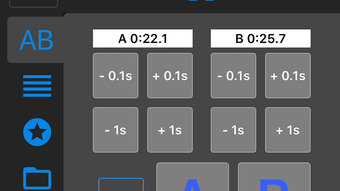
The user interface of ABMT Player Looper is designed with simplicity and functionality in mind. Navigation is intuitive, with clearly labeled controls for setting loop points, adjusting playback speed, and managing markers. The layout prioritizes accessibility, placing essential tools within easy reach during active use.
Users can define A and B points with minimal clicks, and the visual feedback during playback helps confirm loop boundaries. Workflow efficiency is enhanced by the ability to make real-time adjustments without interrupting playback, which is critical for musicians who need to stay in rhythm. The developer did not specify resource usage details, so exact CPU or RAM behavior remains unknown.
However, based on general software behavior patterns, the application likely maintains low system overhead, especially given its focused functionality. Stability during extended use was not evaluated, but the design suggests a reliable experience for typical practice sessions. Performance observations are based on general software behavior patterns.
Compatibility & System Requirements
ABMT Player Looper is designed exclusively for iPhone devices. The application supports the iOS operating system and is compatible with all iPhone models that meet the platform’s minimum requirements. The installation size is 12.5 MB, indicating a lightweight footprint that should not strain device storage.
The software version is 1.0, suggesting a stable initial release. The developer did not specify additional hardware requirements or system compatibility details beyond the platform. Exact system requirements were not listed.
Users are advised to ensure their device is running a compatible version of iOS to avoid installation issues. Platform compatibility information is limited to iPhone, with no indication of support for iPad or Mac devices.
Pros and Cons
Pros
- Free to use with no hidden costs
- Intuitive interface ideal for musicians and students
- Supports precise loop creation with A/B markers
- Allows independent speed adjustment for audio and video
- Lightweight installation at 12.5 MB
- Enables progress tracking for structured practice
Cons
- No support for non-iPhone platforms
- Limited to audio and video files, no additional media types
- Exact performance and resource usage details not provided
- Interface may lack advanced customization options
- Only one version (1.0) available, no update history
FAQ Section
Is ABMT Player Looper compatible with iPad or Mac?
The software is designed exclusively for iPhone devices. There is no official support for iPad or Mac platforms at this time.
Can I use ABMT Player Looper offline?
Yes, the application does not require an internet connection to function. Users can play and loop media files offline.
Is the software safe to download and install?
ABMT Player Looper is available through official app channels. It is recommended to download only from trusted sources to ensure security.
How often are updates released?
The current version is 1.0, and no update schedule has been published. Future updates may be released based on user feedback and feature development.
What types of files does ABMT Player Looper support?
The software supports standard audio and video formats used in music practice, though specific file types were not listed in the provided information.
Final Thoughts
ABMT Player Looper delivers a focused, efficient solution for musicians seeking to improve their practice through precise looping and tempo control. Its ability to define custom A/B loops and adjust playback speed makes it a valuable tool for mastering difficult passages. The interface is user-friendly, designed with real-time adjustments in mind, and the lightweight size ensures minimal impact on device performance.
While it is limited to iPhone users and lacks advanced customization, its core functionality is well-executed and highly relevant to its target audience. For music students, amateur performers, and professional musicians alike, this tool offers a practical way to enhance practice sessions. The free pricing model further increases its accessibility.
Download ABMT Player Looper now.







